At a glance
What: The Analytics page sums up your closed trades in key metrics, charts and tables and shows the cash flows of your account next to them.
How: You pick account, category, strategy and period at the top. Every change recomputes the whole page.
Result: You see how your trades developed and can trace which part of your account value comes from trades, from dividends and interest or from deposits.
How to review strategies and mistakes and get from a row to the trades behind it is described under Reviewing trades.
The filters
The bar at the top filters by:
- Account: a single IBKR account or all of them together.
- Category: All Types, Stocks & Futures or Options.
- Strategy: one of your strategies from the catalog.
- Symbol: a single underlying, with suggestions as you type.
- Period: two date fields or the quick picks 1M, 3M, 6M, YTD, 1Y and All.
A trade counts in the period when it was closed in it. Open trades do not count. All amounts are in your base currency, shown on the right of the bar. Foliograph converts trades in other currencies at the rate of the closing day. You set the base currency during setup under Settings > General. After that it stays fixed so earlier conversions remain consistent.
Category, strategy, symbol and the row filters only apply to the trades. Cash flows and account value belong to the whole account and follow only account and period.
Key metrics
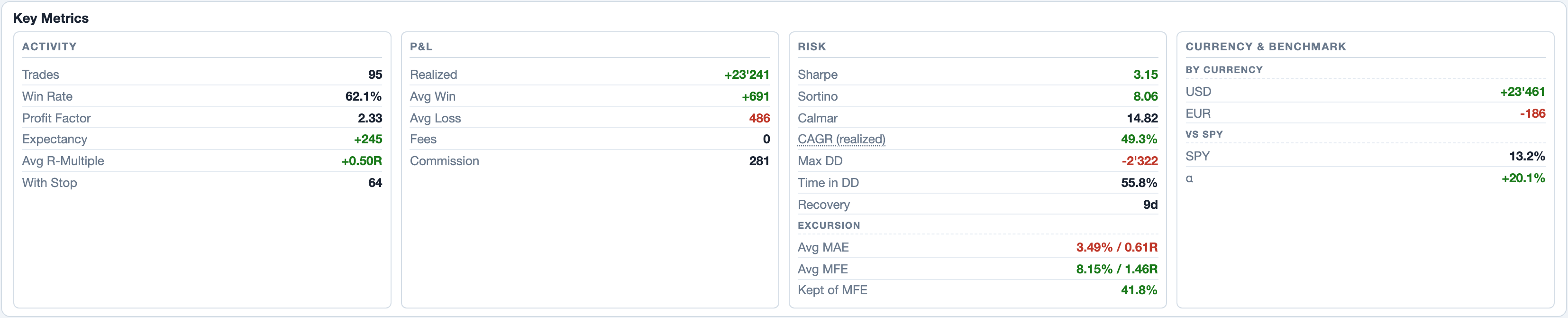
The Key Metrics section has four columns.
Activity
- Trades and Win Rate: the number of closed trades and the share of winners.
- Profit Factor: the sum of all gains divided by the sum of all losses. Above 1 the gains exceeded the losses.
- Expectancy: the average result per trade from win rate, Avg Win and Avg Loss.
- Avg R-Multiple and With Stop: the average of the R-multiples and the number of trades with an initial stop. How the R-multiple is computed is described under Recording the plan.
If you rolled options, the Rolls block follows, described under Rolls.
P&L (profit and loss)
Realized is the sum of the results of all trades in the filter after commissions. Next to it are Avg Win, Avg Loss plus the totals of Fees and Commission.
Risk
- Sharpe and Sortino: return relative to fluctuation, annualized (factor √252). The basis is the realized result of the trades per day, not the daily return of the whole account. The values are therefore not directly comparable with the Sharpe ratio in a fund report or from IBKR. Every weekday from Monday to Friday between the first and the last closed trade counts, exchange holidays included, days without a close as 0. Sortino measures only the downside fluctuation: every day below 0 enters with its loss, all other days with 0. Both work without a risk-free rate and appear from 20 days on.
- CAGR (realized): an approximation of the annual growth rate. Foliograph sets the realized profit against the capital at the start of the period, with deposits and withdrawals weighted by the time they were in the account. The commissions of the trades are included in the realized profit. Dividends, interest, fees from the cash flows and the value change of open positions are not. The start capital comes from the account value closest to the start (statement or TWS). Without an account value the field stays empty.
- Calmar: CAGR divided by the maximum drawdown. For this, Foliograph sets Max DD against the same capital as CAGR, which turns it into a percentage.
- Max DD: the largest fall of the Realized curve from a peak, as an amount in base currency.
- Time in DD: the share of closed trades after which the curve was below its previous peak. It counts trades, not calendar days.
- Recovery: the calendar days from the lowest point of the largest drawdown until the curve exceeds the peak before it again. The time from the peak to the low is not included. A dash means the curve has not reached that peak again yet.
For stocks the Excursion block shows Avg MAE and Avg MFE, meaning how far the price moved against you and in your favour between entry and exit. Kept of MFE is the share of the best interim move the trades still had at the exit.
Currency & Benchmark
By Currency shows the realized result in the trading currency of the trades, without conversion. vs SPY puts the price change of SPY from the first to the last closing day next to your realized return on the same capital as CAGR. Difference is the gap between the two, a plain difference and not a risk-adjusted alpha as in CAPM. It compares two different quantities: the realized result of your trades and the price return of SPY without dividends. The comparison describes the past period.
Categories and highlights
Performance by Category splits the trades into stock/future trades, stock/future investments and option trades, each with result, count, win rate and profit factor. The split between trade and investment follows the intent. Trade Highlights names the best and the worst trade, the current and the longest streak of winners and losers plus the average holding time.
The equity curve
The Equity tab shows three lines:
| Line | What it contains |
|---|---|
| Realized | the summed results of the closed trades in the filter, starting at 0 |
| Total Return (dotted) | Realized plus net income, meaning all cash flows except deposits and withdrawals: dividends and credit interest raise it, withholding tax, margin interest and fees lower it |
| IBKR NAV (orange) | the account value from TWS or the statements, one value per day |
The Realized curve gets one point per closed trade. It is not a curve of the account value: deposited capital and open positions are missing from it. Total Return has no unrealized profits and losses either, so it is not a complete portfolio return. The NAV line therefore usually sits well above it. If there is only a single account value so far, a dotted line shows that value with its date.
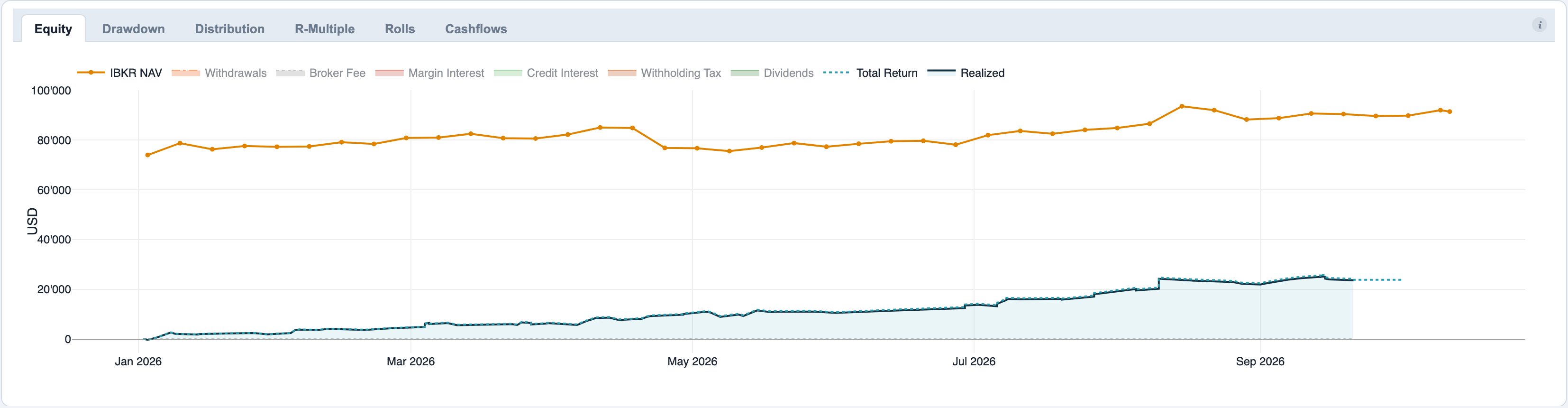
The legend also lists the kinds of cash flows, for example dividends, margin interest or deposits. They start hidden. A click on an entry shows it and stacks it on top of the Realized curve. With a complete history and no date filter, the top of the stack approaches the account value once every kind is shown. What is still missing then is described under Realized, Total Return and account value.
Working the charts: a click on a legend entry shows or hides it, a double-click shows only that one. Dragging in the chart zooms, a double-click in the chart resets the zoom.
Drawdown, distribution and R-multiple
- Drawdown: the distance of the Realized curve from its previous peak, in base currency. At 0 the curve is at a new peak.
- Distribution: a histogram of the results per trade, gains green and losses red. It shows whether a few large trades or many small ones carry the result.
- R-Multiple: the same for the R-multiples. The tab stays empty as long as no trade has an initial stop.
Rolls
If you rolled options, the Rolls block in the key metrics shows the number of rolled trades, the roll events and the added days of runtime. Median Strike/Day is the change of the strike in percent of the old strike per added day, Median Premium/Day the net premium of the roll on the same basis. The percent basis makes rolls on underlyings with different prices comparable.
The Rolls tab shows every roll event as a point. To the right is the moneyness of the bought-back option on the roll date (positive means in the money), upwards the change of the strike per added day. A circle is a put, a diamond a call, the size stands for the number of contracts. A click on a point opens the trade. If the price of an underlying on the roll date is missing, the tab names the symbols and fetches them with Load quotes. The table below lists every event, including those without a price. How Foliograph detects a roll is described under Options in the journal.
Assignments to option
In the imported IBKR data an assigned short option is converted into shares without a price. The option trade thus keeps the whole premium as its result, the shares open at the strike and the price loss shows in the stock trade. A bull put spread with an assignment thus shows as a winner, the loss sits with the stock.
The Assignments to option toggle on the right of the Key Metrics header attributes this differently for the analysis: the move from the strike to the close of the assignment day then counts for the option trade, the rest stays with the stock trade. This is an attribution for the analysis, not a booking. How Foliograph links option and stock is described under Assignment chain.
- Realized stays the same over both trades, only the split changes. Categories, strategies, option strategies, win rate, profit factor and the curves are affected.
- An assignment counts once the stock trade is closed. If option and stock fall into different periods, the amount moves between the periods.
- If the close of the assignment day is missing, a note below the Key Metrics title names the symbol and Load quotes fetches it.
Foliograph remembers the setting. When it is off, Foliograph uses the attribution from the imported IBKR data.
Cash flows
Cash flows are all bookings in the account that are not trades. Foliograph reads them from the Cash Transactions section of the Activity Flex Query or from an imported statement. The kinds:
- Dividend and withholding tax
- Credit interest and margin interest
- Stock lending fee, broker fee, currency conversion fee and other fees
- Deposit / withdrawal
- Other
The Cash Flow Ledger below the charts sums them up for the period: at the top the net income plus the deposits and withdrawals, below one row per kind. The amounts are in their original currency, without conversion. Deposits and withdrawals carry the capital tag: they change the money you put in, but they are no income and therefore do not count toward Total Return.

The Cashflows tab lists every single booking with date, kind, account, amount, currency, the conversion rate into the base currency and the converted amount. The filters in the header row pick kind, account and currency, the description field searches the booking text, with * as a wildcard (for example *dividend*). For the conversion Foliograph uses the exchange rate of the booking date. If that rate is missing, Foliograph uses an approximation, marked with ≈.
Realized, Total Return and account value
The three lines of the equity curve measure different things. For a chosen period, roughly:
Account value at the end ≈ account value at the start plus deposits minus withdrawals plus Realized plus net income plus the change in unrealized profits and losses plus currency effects
Without a date filter and with a complete history since the account opening, the account value at the start is 0.
- Between Realized and Total Return lies the net income: dividends and credit interest raise it, withholding tax, margin interest and fees lower it.
- Between Total Return and IBKR NAV lie the account value at the start of the period, the deposits and withdrawals, the unrealized profits and losses of the open positions plus currency effects. If early cash flows are missing from the imports, the gap grows (see Missing deposits).
With a category or strategy filter you compare part of the trades with the whole account. For this check, pick All Types and all strategies.
Missing deposits
If the Cash Flow Ledger shows the hint Heads up - missing historical deposits?, the captured deposits, the realized profit and the net income together explain only a small part of your current account value. Foliograph shows it only without a date filter, when the captured deposits are below 30% of the account value and more than 20% of the account value remains unexplained.
Usually the imports do not cover the whole history of the account, for example because the Flex Query delivers only its configured period (365 days at most). The fix: download a statement from the account opening onwards as CSV in the IBKR Client Portal and import it as described under Importing historical trades via CSV. Foliograph skips bookings it already has. Afterwards the start capital for CAGR and Calmar is more accurate as well.
Breakdowns and hedge budget
The Breakdowns show the trades by strategy, symbol, option strategy, month, weekday of the close and holding time. A click on a row filters the whole page to those trades, described under The trades behind a number. The Mistake Review is described under Reviewing trades.
The Hedge Budget appears as soon as you have flagged a strategy as a hedge in the catalog. It sets the premium you collected in the period with your other option trades next to the premium you paid in hedge strategies in the same period, per month and per hedge strategy. It counts the premium at the opening, in the month of the fill. This is an analysis over time. The Open hedges line in the portfolio, by contrast, measures only the positions open today. The dashed line is your own target from Settings > General > Hedge Budget Target. The hedge budget follows account and period, but not category and strategy.
Related
This page is also in the app under Help, in the language of the interface. Question not answered? Write to info@foliograph.ch or use the contact form.