At a glance
What: An option trade in the journal follows a position from opening to the end, including rolls, expiry and assignment.
How: Foliograph reads the executions and codes from IBKR, detects the option strategy from them and sets tags such as Rolled, Expired or Assigned.
Where: In the Options journal, on the trade page and in the portfolio.
This chapter describes what Foliograph records. It does not assess any strategy and does not suggest any action.
Opening
An option order becomes a trade with one leg per contract (underlying, expiry, right, strike, multiplier and ratio). All legs of a combo order land in the same trade, so an iron condor is one row with four legs.

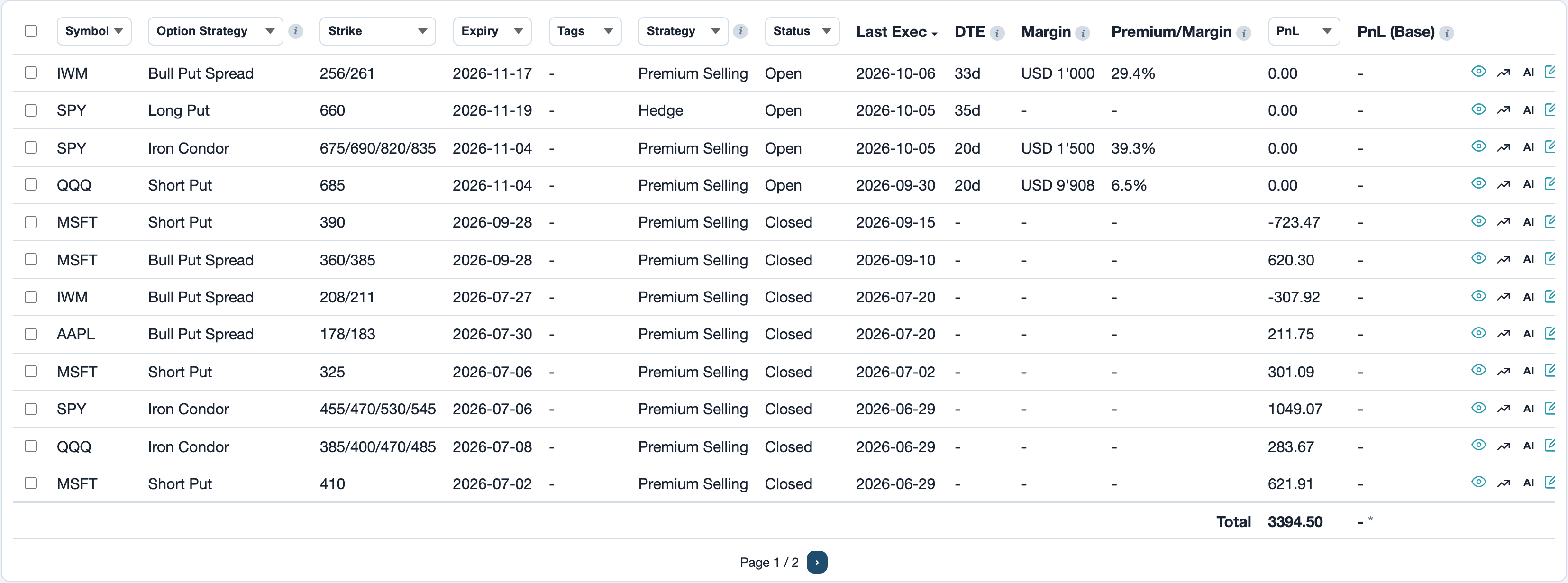
The Options journal shows the detected option strategy, the strikes, the expiry and the remaining days (DTE) for every trade. How a trade is built from executions is described under Fixing trades.
Partial close
If you close only part of the contracts, the trade stays open and changes to the status Partial. The remaining quantity is shown on the trade page. Only when no contracts are open any more is the trade Closed and the P&L final.
Roll
A roll closes an option and opens a new one on the same underlying with a different strike or expiry. When all open legs are closed and new ones are opened at the same time, as with a combo order or the Roll function in TWS, the old and new legs stay in the same trade. The trade gets the tag Rolled.
- Rolls table: On the trade page it lists every roll with strike change, expiry change, added days, Strike/Day, net premium (credit or debit) and Premium/Day.
- Strike/Day (called Roll Eff. up to version 0.3.20): Strike difference divided by the added runtime in days. Example: a 420 put with 13 days left is rolled to a 395 put with 43 days. That is 25 strike points for 30 added days, so 0.83 points per day.
- Premium/Day (new in version 0.3.21): Net premium of the roll divided by the added days, per contract unit like the option price. In the example the 420 put is bought back at 15.00 and the 395 put sold at 14.60. That is a debit of 0.40, so -0.013 per day. A roll for a credit gives a positive value.
- In the journal: Both values are available as the Strike/Day and Premium/Day columns, weighted by contracts across all rolls of a trade. They are hidden by default and can be shown via Columns. Together they show how much strike distance and how much premium a roll brought per added day.
- Spreads: A spread rolled as a whole is one roll. Strike/Day measures the strike of the short leg, Since version 0.3.21 Credit/Debit and Premium/Day include the premium of all legs because the long leg reduces the credit. Foliograph recognizes the legs of a roll by the shared identity of the IBKR combo order. Rolling only the long leg or adding a leg is not a roll.
- Analytics: The Rolls tab shows all rolls of the selected period, the Activity area of the key metrics the median of Strike/Day and Premium/Day in percent of the old strike.
When the legs of a roll land in two different trades because the target contract was already open as a separate trade, Foliograph merges the two trades automatically after the import and notes this in a comment.
Expiry
When the expiry of all legs lies in the past and there are no closing executions, Foliograph treats the option as expired worthless and sets the trade to Closed:
| Position | P&L on worthless expiry |
|---|---|
| Short | The full premium received |
| Long | The full premium paid, as a loss |
If IBKR delivers the code Ep (expired) in a statement or Flex report, the trade also gets the tag Expired.
Assignment and exercise
On assignment IBKR books a stock or futures execution with the code A. Like any other execution it lands in a stock or futures trade. Foliograph closes the matching short option trade (same underlying, strike and account, expiry on or before the assignment day):
- status Closed, tag Assigned
- a comment with the date, symbol and strike of the assignment
IBKR delivers the assignment only in the Activity Flex Query, not in the trade confirmations. If you sell the assigned shares before the Activity query delivered them, the sale first opens a short position with a note. Foliograph then fetches the Activity query right away and rebuilds the trade as soon as the assignment is there.
An exercise (code Ex) gets the tag Exercised. For executions without codes (from TWS, for example) Foliograph recognizes an assignment by an execution with price 0 and commission 0.
Assignment chain
The option trade and the stock trade that received the assigned shares stay two trades, the way IBKR and the statement book them. Foliograph links them though. On assignment the option is not sold but converted into shares. IBKR therefore books it in the option trade without a price, its value is in the purchase price of the shares at the strike. That execution and the stock execution with the same time, strike and quantity belong together. The same applies to exercises.
On the page of both trades the Assignment chain card shows every linked trade with its result plus the total. The right column attributes the move from the strike to the close of the assignment day to the option. The rest stays with the stock trade, since it depends on how long you hold the shares.
If Foliograph does not find the link by itself, pick the stock trade under Shares from this assignment on the page of the option trade and click Link. The × removes a link. An automatically detected one then stays removed.
In Analytics the Assignments to option toggle applies this split to every metric once the stock trade is closed. The total stays the same. The toggle is off by default and the figures match IBKR.
Example
You sell a short put with strike 760 on 2 contracts and collect 1'500 premium. It is assigned: you buy 200 shares at 760. On the assignment day the stock closes at 730, the day after you sell the shares at 724.62.
This is how IBKR books the two trades:
| Trade | Calculation | Result |
|---|---|---|
| Option | converted into shares without a price, the whole premium counts as a gain | +1'500 |
| Stock | bought at 760, sold at 724.62: (724.62 - 760) × 200 | -7'076 |
| Total | -5'576 |
The put shows as a winner, although it was 30 points in the money at the assignment. But 6'000 of the stock loss arose at the assignment already: the shares cost 760 and were worth only 730 the same day, so (730 - 760) × 200. That part is the loss of the put. The remaining -1'076 came afterwards, because you sold the shares a day later below the close.
The right column of the assignment chain moves the 6'000 from the stock trade to the option:
| Trade | Calculation | Result |
|---|---|---|
| Option | 1'500 - 6'000 | -4'500 |
| Stock | counted from 730 instead of 760: (724.62 - 730) × 200 | -1'076 |
| Total | unchanged | -5'576 |
The option now shows what the put strategy cost, the stock only the decision when to sell the shares. If you hold the shares for weeks, for example to write calls on them, that later price move stays with the stock trade.
Covered positions
Foliograph links a short option to the stock position in the same account and on the same underlying that was held while the option was open:
| Option | Cover | Option strategy |
|---|---|---|
| Short call | Long stock position | Covered Call |
| Short put | Short stock position | Covered Put |
| Short put, assigned, without short stock | none | Cash Secured Put |
Foliograph does not link spreads to a stock position. Their long leg of the same type already caps the risk.
The trade page shows the link in the Covered by field. If it is missing or wrong, choose the right position under Covered By (Stock/Future Position) and click Link. Margin per trade measures the stock and the option together.
Option split
On an option split Foliograph adjusts the legs, strikes and symbol of the open trade, for example a 125 put becomes a 62.5 put on a 2:1 split. Executions before and after the split stay one trade. Details under Corporate actions.
Detected strategies
Foliograph determines the option strategy from the number, right, strikes and expiry of the legs and from the timestamps of the executions. The name appears in the Option Strategy column and is used by Analytics for grouping.
| Legs | Strategies |
|---|---|
| 1 | Long Call, Short Call, Long Put, Short Put, Covered Call, Covered Put, Cash Secured Put |
| 2 | Bull Put Spread, Bear Put Spread, Bull Call Spread, Bear Call Spread, Straddle, Strangle, Calendar Spread and Diagonal Spread (each Long or Short, for calls and puts) |
| 3 | Put Butterfly and Call Butterfly, Broken Wing Butterfly, Short Butterfly, butterflies with unequal quantities (ratio such as 2-3-1 in the name) |
| 4 | Iron Condor, Double Calendar Spread, Double Diagonal Spread |
| other | Spread |
Several legs only count as a spread when they were executed together in the same combo order. If legs are added later, during an adjustment for example, Foliograph does not classify them as a spread. After an update with new strategy types, Reprocess re-detects the name of a trade.
The option strategy describes the structure of the position and cannot be edited. The Strategy next to it is your own label from Strategies & Mistakes.
Chart with strikes
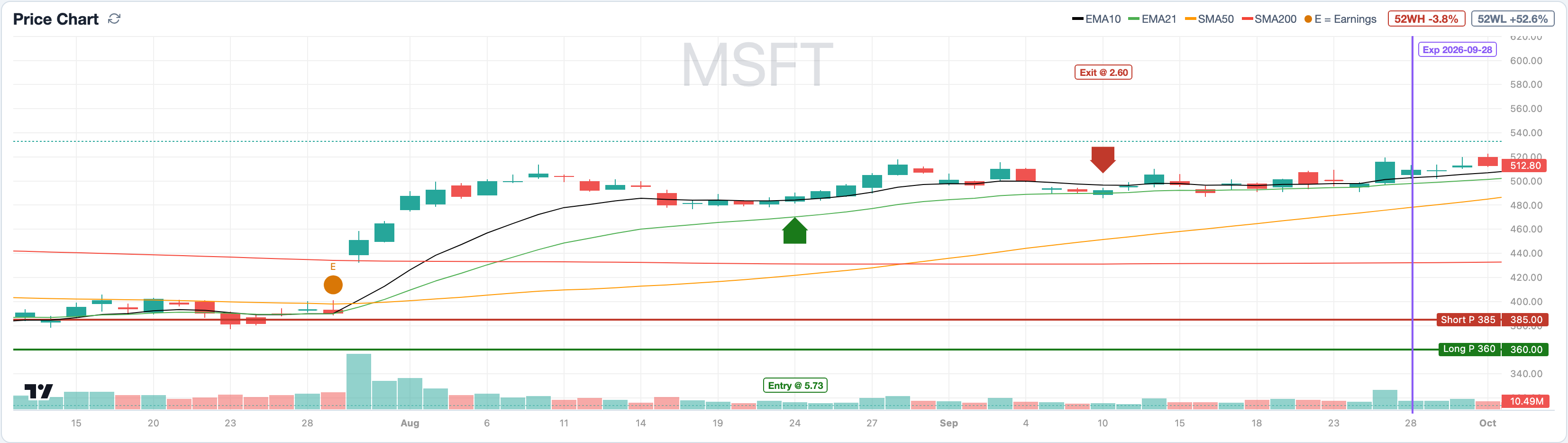
The Price Chart on the trade page and the chart icon in every journal row show the daily chart of the underlying with a horizontal line per strike, a vertical marker at the expiry and the entry and exit points. For stock options an orange E marks the past earnings of the underlying. This makes visible how close the price came to the strikes during the runtime and whether a quarterly report fell within it.
Related
This page is also in the app under Help, in the language of the interface. Question not answered? Write to info@foliograph.ch or use the contact form.